News · Product · November 17, 2026
A Chrome extension for secrets: Send and Guard
Send a password as a link that opens once, and get a warning before a key is pasted into an AI chat. Free in the Chrome Web Store.
DRIVE 369 DAO · 4 min read
Ghostdrive now has a Chrome extension with two tools. Send turns a password, a key or a note into a link that opens once. Guard warns you before a secret is pasted into an AI chat. Both work in the browser, need no account and are free. It is in the Chrome Web Store.
Both tools answer the same moment: a secret is about to leave your hands and stay somewhere you do not control.
Send: a link that opens once
A password sent in a chat or an email stays there. It is still in the history, in the backups and on every device of both people long after anyone needed it.
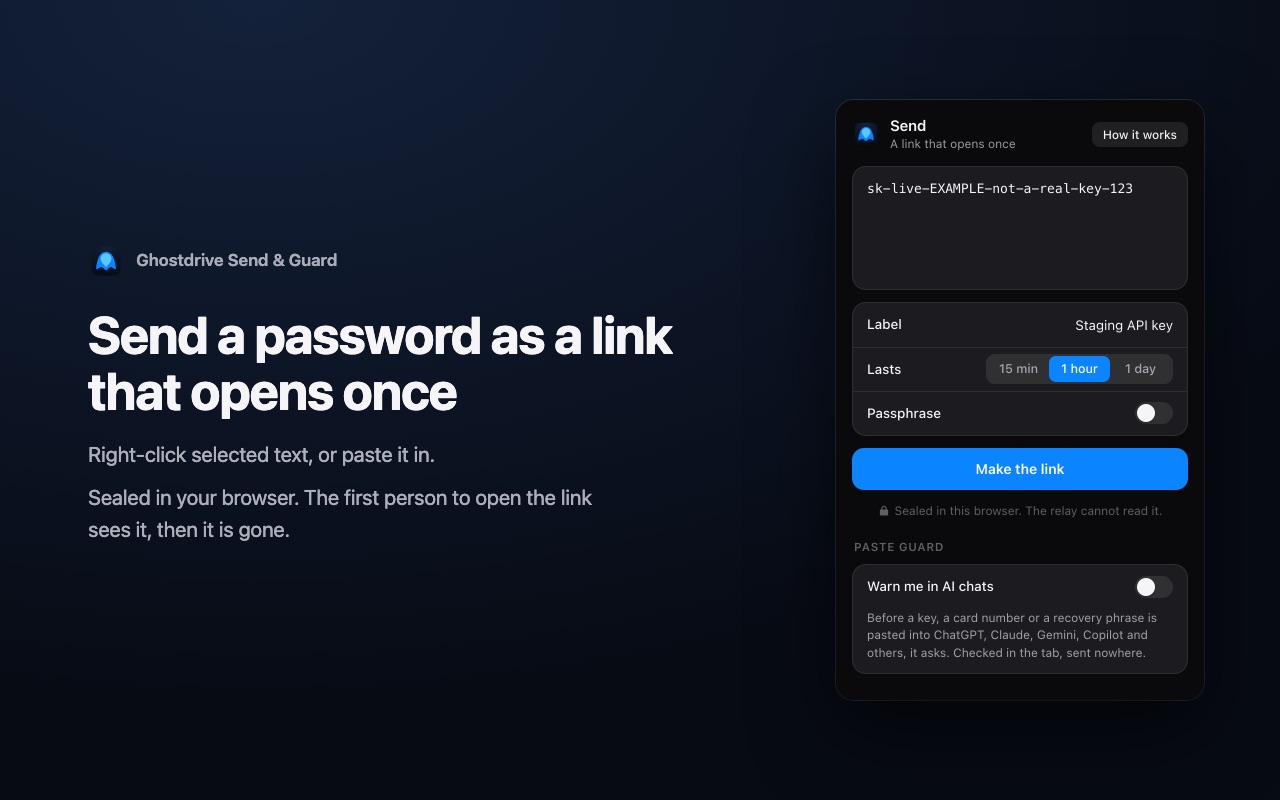
- Select the text on any page, right-click and choose "Send as a one-time link". Or open the extension and paste.
- Send the link in the chat or email you already use. The text is encrypted in your browser before it leaves, and the key is only in the link.
- The first person to open it sees it, and then it is gone. The extension shows when it was opened, on what kind of device and from which country.
A link lasts 15 minutes, an hour or a day. You can add a passphrase, which you give to the receiver another way; five wrong tries destroy the link. You can take a link down before it is opened. The receiver installs nothing: the link opens on ghostdrive.com in any browser.
Guard: a warning before the paste
A config file, a log or a piece of code pasted into an AI chat often has a live key inside it. Once it is sent, it sits in a chat history.
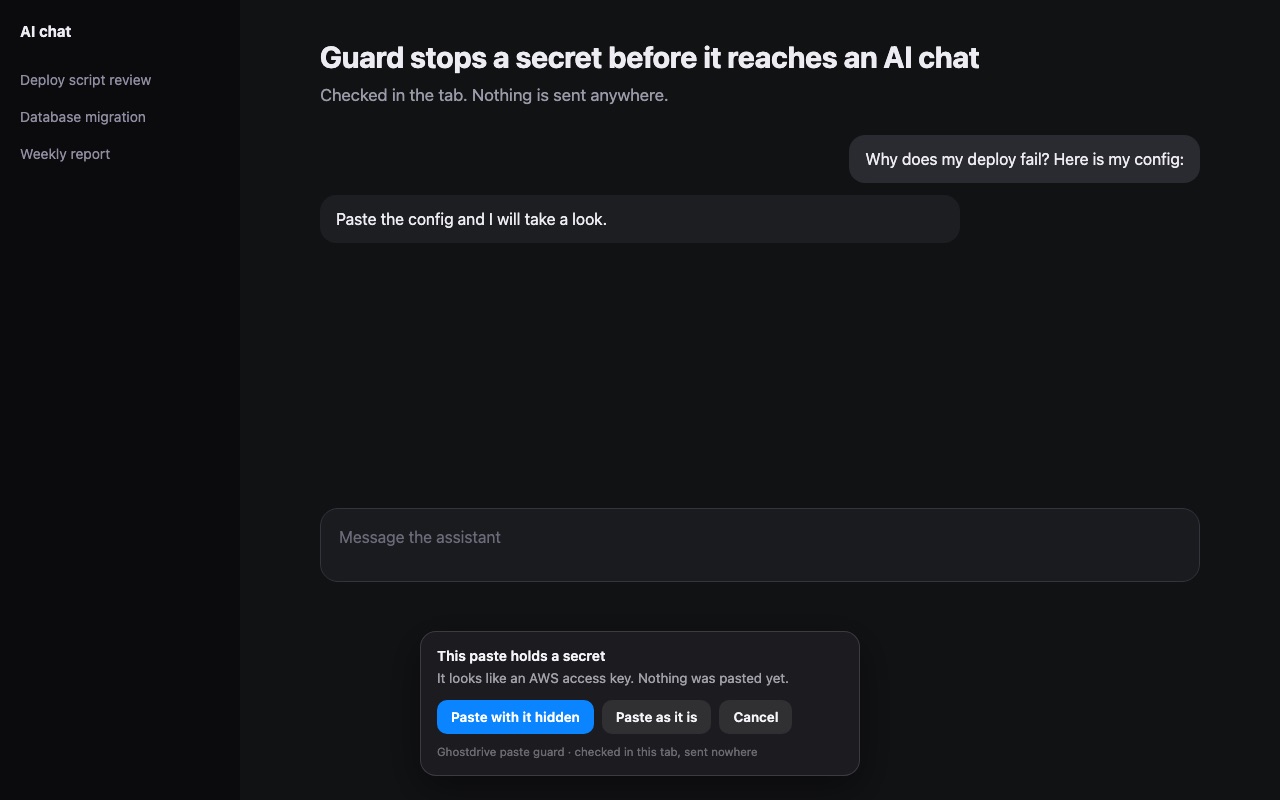
Guard is off until you turn it on. Chrome then asks to let it run on AI chat sites, and only there: ChatGPT, Claude, Gemini, Copilot, DeepSeek, Perplexity, Grok and Mistral. When a paste holds an API key, a private key, a card number, a recovery phrase or a password in a setting, the paste is stopped before the page sees it. You choose:
- Paste with it hidden. The text goes in with the secret replaced by a note such as "[hidden: AWS access key]".
- Paste as it is.
- Cancel.
The check runs inside the tab. Nothing is sent anywhere.
Who it is for
One person. You need to give a relative the Wi-Fi password or a card's security code. Send it as a link that lasts an hour instead of a message that lasts for ever.
A team. A new colleague needs a database password on the first day. The sender sees that the link was opened once, by one device, and knows the password did not sit in a channel that forty people can search. Developers who debug with an AI assistant turn Guard on and stop pasting production keys with their logs.
What it asks your browser for
| It asks for | Why |
|---|---|
| The right-click menu | One entry on selected text. The text comes from your click; the extension reads no page for it. |
| Its own storage | A signing key it makes for itself and the list of links you sent: names and times, never the text, the link key or the passphrase. |
| The Ghostdrive relay | The only server it talks to. It receives bytes it cannot open. |
| AI chat sites, only if you turn Guard on | To check what you paste there. Turn Guard off and Chrome takes the access back. |
It has no analytics and no advertising. The full account is on the extension page.
Status and limits
- Install from the store. The Chrome Web Store listing is linked on the extension page. Browsers built on Chrome can use it too.
- Send carries text only, up to 20,000 characters. Files are next.
- Guard knows secrets with a recognisable shape. It does not see text typed by hand, attached files, or a plain password in a sentence. It lowers the chance of a mistake; it is not a guarantee.
- Guard is new. We tested its rules and its behaviour in Chrome on our own test pages. The editors of AI chat sites change often, so a paste may slip through on one of them. If it does, tell us.
- A link that was opened cannot be unseen. Whoever opens it can copy what it holds. One-time means one opening, not one reader for ever.
Write to hello@ghostdrive.com with what broke and on which site.
Questions
- What does the Ghostdrive Chrome extension do?
- Two things. Send turns a password, a key or a note into a link that opens once. Guard warns you before a secret is pasted into an AI chat and offers to paste it with the secret hidden.
- Can Ghostdrive read what I send?
- No. The text is encrypted in your browser and the key is only in the link. The relay stores bytes it cannot open and deletes them when the link is opened, taken down or expires.
- Does Guard send my pastes anywhere?
- No. The check runs inside the tab. The extension keeps one number: how many pastes it stopped.
- Where do I install it?
- From the Chrome Web Store: the listing is linked on the extension page at ghostdrive.com/Extension. It is free and needs no account.